
“Oh no! I can't find my phone! Did I leave it at the coffee shop, or is it hidden in my messy room?”
When we can't find our Phone, we get really worried because it's not just a gadget – it's like a best friend that keeps our special moments, important phone numbers, and crucial details.
If you need to find your lost iPhone for free, start with Apple's Find My service. This guide explains how to check its location online, what to do if the phone is offline, and which other steps may help you recover or secure it.
We'll cover find my phone free options, including their limitations. You do not need to pay for a phone-number tracking website to try Apple's official tools.

Part 1: How to Find My Phone for free: Take action now!
If your iPhone goes missing, act quickly. You can use Find My on another Apple device or open icloud.com/find from a browser if Find My was enabled before the phone was lost.
| Scenario | Action to Take |
| Just realized your phone is missing | Keep calm and think back to where you were |
| Phone might be nearby | Use another phone to call your missing iPhone |
| Can't remember where you last had it | Look at places you've been recently |
| Have "Find My" app set up | Use the "Find My" app to locate your phone |
| Others might have seen your phone | Ask your family or friends if they've noticed your phone |
| Phone could be in your usual spaces | Look carefully in your house, car, and office |
| Phone might be left at a public place | Call places you've been recently to see if they have it |
| Considering remote actions | Open Find My and mark your iPhone as lost if you cannot find it; do not erase it unless needed to protect your data |
Start with Apple's free Find My service. The other steps below may help you recover the phone or protect your information, but they do not all provide a live location on a map.
Part 2: Five Free Ways to Find or Secure a Lost iPhone
Method 1: Use Apple Find My (iPhone)
Apple Find My is the most reliable free option for finding your own missing iPhone. If Find My was enabled before the loss, it may show the current or most recently available location. You can also play a sound, mark the device as lost, or erase it remotely as a last resort.
Steps to find your lost iPhone for free:
Step 1: On a browser, open Find Devices at iCloud.com/find, or use Find My on another Apple device. Sign in with the Apple Account associated with your missing iPhone.
Step 2: Select your missing iPhone from the device list. You may see a current, last known, or Find My network location if available. If Find My was never enabled, the device will not appear for remote location or Lost Mode.

Step 3: Select Play Sound or Mark As Lost if appropriate. Use Erase This Device only when protecting your data is more important than trying to recover the phone.

Apple Find My is free. If you suspect theft, do not go to an unfamiliar location to recover the phone yourself; contact local authorities instead.
Method 2: Understand Google Find Hub (Android Only)
Google Find Hub, formerly Find My Device, is a free tool for locating supported Android devices. It cannot directly locate a lost iPhone, even if the iPhone uses a Google Account or Google apps. For an iPhone, use Apple's Find My instead.
You can access Google's service in a browser to find your own eligible Android device, but it is not a workaround for an unavailable iCloud account. The illustration below refers to an Android device, not to iPhone tracking.
How Google Find Hub works for an Android device:
Step 1: Open the official Google Find Hub website and sign in to the Google Account on the missing Android device.

Step 2: If that Android device meets the requirements, Find Hub may show its location and options to play a sound, secure it, or erase it. These actions do not apply to a missing iPhone.
Method 3: Avoid Misleading Phone-Number Tracking Sites
A website cannot reliably show your iPhone's live GPS location just because you enter its phone number. Be cautious of 'find iPhone by number free' claims, payment prompts, and requests for your Apple Account password or verification codes.
Mobile carriers may use network information for their own services or lawful requests, but ordinary public websites do not have direct access to a phone's cell-tower location. If you cannot access Find My, focus on securing your Apple Account and contacting your carrier.
Steps to assess a phone-number tracking claim safely:
Step 1: Treat sites such as Mobile Number Tracker as unverified claims, not an official Apple location method. Do not enter passwords, one-time codes, or payment information.

Step 2: Use icloud.com/find instead, if Find My was enabled. If someone offers to recover your iPhone for a fee based only on its number, be skeptical.
You cannot normally find an iPhone's precise location using only its phone number for free. Find My, an existing authorized location-sharing arrangement, or help from authorities are more appropriate routes.
Method 4: Ask Trusted Contacts and Nearby Businesses
If your iPhone may have been left at a shop, school, restaurant, or another public place, contacting that place can help. Friends and family may also remember where you last used it or have seen it nearby.
You can ask a trusted local group for help, but do not publish your home address, phone unlock code, Apple Account credentials, or the precise live location shown by Find My. Never arrange a risky in-person pickup alone.
Steps to ask for help safely:

- Contact the last business or venue you visited and describe the missing iPhone.
- Ask trusted friends and family whether they saw it or picked it up for safekeeping.
- If helpful, post a general lost-item notice in a moderated local group without sharing sensitive details.
- If someone claims to have your iPhone, verify the claim carefully and use a safe collection location.
Method 5: Contact Your Mobile Carrier
Your mobile carrier can help protect a lost iPhone account by suspending the line or advising you about a stolen device. A carrier generally will not provide you with a live tracking map just because you request cell-tower data.
If you think the phone was stolen, ask the carrier about reporting the device and protecting your SIM or eSIM. Use Find My to mark the iPhone as lost, and report theft to the relevant authorities when appropriate.
Steps to contact your mobile carrier:
Step 1: Call your carrier using its official support number. Verify your identity and explain that your iPhone is missing. Ask how to secure your line and report the device as lost or stolen.

Step 2: Request a suspension or SIM/eSIM protection if necessary, and review your account for unusual activity.
Carrier support may help prevent misuse, but it is not a replacement for Find My when you need to locate a lost iPhone.
Part 3: FamiSafe Location Tracking for a Previously Paired Family Device
The free Apple Find My service should be your first step for a lost iPhone. FamiSafe offers a different service: family location sharing and parental controls for devices that have already been set up and paired.
If FamiSafe was installed and configured on your child's device before it went missing, its Live Location feature may show the latest available location, depending on permissions, connectivity, and device status. It cannot locate an unpaired iPhone by number alone.
FamiSafe also supports location history and geofences for compatible connected family devices. These features are helpful for day-to-day family safety but do not replace Apple Find My or guarantee the recovery of a stolen phone.
How to set up FamiSafe on a family device before it is lost:
Step 1: Install FamiSafe from the App Store or Google Play on the appropriate devices, then sign in or create a family account.

Step 2: Connect the two devices using either a QR code or a pairing code.
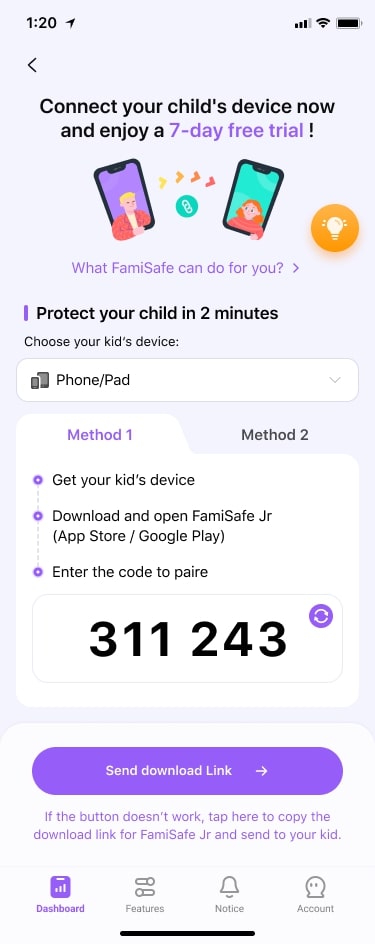
Step 3: Complete setup on the child's device and grant the necessary permissions, including location access, using the instructions for that device.

Step 4: On the parent device, open Live Location in FamiSafe. You should see a map for the connected family device when location information is available.

Step 5: You can now view the real-time location of the connected device. Keep in mind that this feature may consume significant battery power on the tracked device.
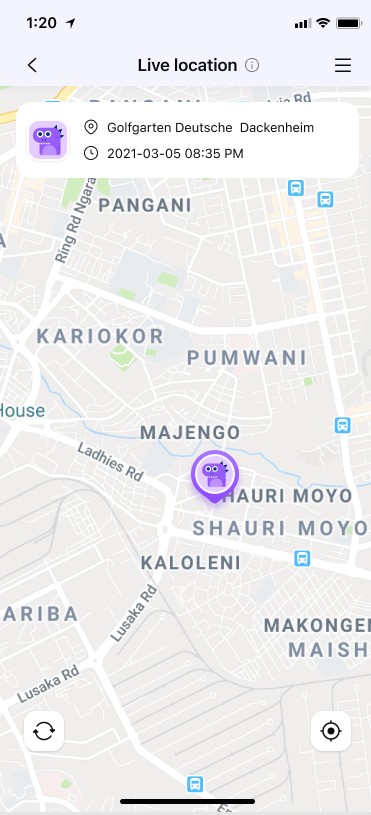
FamiSafe can be useful when configured in advance for a family member’s device. If you are looking for your own missing iPhone and have never paired it with FamiSafe, use Apple Find My instead.
How FamiSafe Helps Families Check a Connected Device’s Location
FamiSafe can show the current or last available location of a previously connected child’s device. Geofence notifications may help families notice when that device enters or leaves a defined area, if the permissions and connectivity allow it.
Location history may help you review recent activity, but FamiSafe cannot detect who is using a missing phone or guarantee that it will identify a thief.
FamiSafe is a paid parental-control product, not a free lost-iPhone recovery service. The best free starting point for a missing iPhone remains Apple Find My.
Part 4: Tips on How to Find My Phone For Free
A few simple steps can improve your chances of finding your iPhone and keeping your information secure if it is lost:
- Always keep your phone in the same pocket or place when not in use.
- Turn on Find My iPhone and the Find My network in Settings before the phone is lost.
- Keep important information backed up to iCloud or another secure backup service.
- Set a strong passcode and review Apple Account security settings. Do not share verification codes with anyone claiming to have found your iPhone.
Conclusion
To find your lost iPhone for free, start with Apple Find My on another Apple device or at icloud.com/find. If Find My was enabled beforehand, you may be able to see a current or last known location, play a sound, or mark the phone as lost. Google Find Hub cannot track an iPhone, and a phone-number tracking website is not a reliable substitute.
If your iPhone is offline or cannot be located, contact places you visited, secure your Apple Account, and ask your carrier about protecting your line. For family devices paired in advance, FamiSafe may provide additional location information. If the device cannot be recovered, consider the security and replacement options in this guide to choosing an iPhone for kids.
FAQs
Can I find my lost iPhone for free?
Yes. Use Apple Find My on another Apple device or visit icloud.com/find. It works when Find My was enabled before the loss; the available location depends on the device and Find My network status.
Can I locate a lost iPhone by its phone number for free?
No public website can reliably show the precise live location of an iPhone from its number alone. Avoid sites asking for passwords, verification codes, or payment to reveal a location.
What is the best free app to find my iPhone?
Apple Find My is the recommended free option for your own iPhone. You can use the app on another Apple device or access Find Devices through a browser at icloud.com/find.
Can I find my iPhone when it is turned off or offline?
Sometimes. If Find My and the Find My network were enabled beforehand, a supported iPhone may remain findable for a limited time after power-off, or show its last available location. It cannot be tracked indefinitely without updated location data.