
Many internet users often wonder, “Is XVideos safe?” As one of the most visited porn sites worldwide, it attracts billions of views every year. Yet its popularity comes with hidden risks—ranging from malware embedded in ads to data tracking and potential legal issues. For adults, browsing may seem harmless at first, but privacy violations and security threats can quickly become real concerns. Understanding these dangers is essential for anyone questioning whether XVideos is truly a safe platform to use.
For parents, the risks go even further. Children and teens can stumble upon explicit content on XVideos with just a few clicks, which may impact their mental health, shape unrealistic views of intimacy, and expose them to online predators. That’s why families must know how to block such sites effectively. In this guide, we’ll analyze the content, privacy, security, and legal risks of XVideos—and provide step-by-step solutions to keep kids safe online.
Table of Content
Part 1. What Is XVideos & Its Age Rating
XVideos is one of the largest adult websites in the world, hosting millions of pornographic videos and attracting more than 3 billion visits each month. Consistently ranking among the top 100 websites globally, it is often the first result people encounter when searching for adult content online. Because of its explicit nature, the platform carries a strict 18+ age rating, legally restricting minors from accessing it.
These restrictions are written into the site’s terms of service and mandated by law in many countries. However, age checks are easy to bypass, which makes the site particularly concerning for parents. For adults who ask, “is xvideos a safe site” or “is xvideos.com safe to use,” it’s important to understand that XVideos was built exclusively for adult entertainment—not safety. The next section will explore why the risks go beyond explicit content and extend to privacy, security, and even legal issues.

To put XVideos in perspective, it remains one of the most visited adult platforms worldwide—often outranking other popular porn sites. But popularity doesn’t equal safety. While many adults may ask “is xvideos a safe site”, the reality is that all major porn platforms come with significant risks, especially for underage users. Here’s a quick comparison of XVideos with similar websites:
| Platform | Monthly Visits (Approx.) | Age Rating | Reported Risks |
| XVideos | 3B+ | 18+ | Malware, privacy tracking, legal issues |
| Pornhub | 2.5B+ | 18+ | Data collection, adware, explicit content |
| XHamster | 1B+ | 18+ | Malware ads, weak verification |
As shown above, no adult site can be considered “safe.” Even for adults, risks such as malware and privacy breaches remain high, and for children, these platforms are explicitly harmful.
Part 2. Is XVideos Safe? A Complete Risk Analysis
When people ask, “is xvideos safe to use,” the answer is far from simple. The platform exposes users to multiple risks that go beyond just explicit content. Below is a closer look at the main danger areas:
1. Content Risks
It includes malware from ads or redirects that can damage devices or steal personal details. Some videos may hide phishing attempts or extortion schemes targeting sensitive browsing habits. So, these dangers can lead to financial loss and serious harm to both personal data and device security.
2. Privacy Risks
The site also raises serious concerns for anyone wondering, “is xvideos com a safe site.” The platform collects personal details and even browsing history, which can be shared with third parties. In addition, it can result in profiling through cookie tracking and targeted advertisements, thus exposing privacy to a greater risk.
3. Security Risks
XVideos security threats include corrupted ads containing spyware and viruses that infect computers. Alongside that, fake clone sites mimic XVideos to steal credentials or spread malware. Data breaches can also expose personal information and make the platform a frequent target for cybercriminal activities.

4. Legal Risks
Legal risks on this platform are serious for anyone wondering, “is XVideos safe to use.” The site has been linked to lawsuits involving child sexual abuse material and sex trafficking claims. Some countries demand strict age verification under laws like the EU’s Digital Services Act. Failure may result in huge fines, prosecution, or even a criminal probe.
📊 Pros & Cons of Using XVideos
Part 3. Why Kids Should Not Use XVideos
For parents asking, “is XVideos a safe porn site,” the answer is an emphatic no. Adult content websites like XVideos were never designed with child safety in mind, and exposure at an early age can cause long-term harm. Below are some of the main reasons kids should be kept away from such platforms:

- It has the ability to expose young minds to explicit sexual content that is not mature and may affect their perception of relationships.
- This kind of exposure early in life may provide unrealistic ideas about intimacy, and it leads to confusion and poor emotional development.
- Adult content can condition dangerous sexual behavior and encourage improper personal boundaries in real life.
- While browsing, children can post personal information without intending to do so, which can result in loss of privacy to strangers.
Clearly, no parent would want their child to face such dangers. This is why responsible guardians must actively block XVideos and similar platforms on kids’ devices—something we’ll explore in the next section.
Tip
While technical tools are essential to block unsafe websites, open communication is just as important. Talk to your child about why platforms like XVideos are harmful, and encourage them to share their online experiences. Studies show that kids who feel supported by their parents are less likely to hide risky behaviors online.
Part 4. How to Block XVideos on Kids' Devices
For parents asking, “is XVideos safe to watch” or “how to block xvideos on phone,” the good news is there are reliable ways to restrict access. Below are three effective methods—ranked from the most comprehensive to the simplest.
Method 1. Use FamiSafe for Instant Blocking (Recommended)
FamiSafe is the best option for blocking harmful sites across different devices, making it ideal for families. It works on iPhone, Android, Chromebook, Windows, and Mac by offering a single solution for complete online safety. The website filter blocks adult and violent content, including XVideos, using more than 10 native categories. Parents can also add specific websites to the blocklist for personalized control over browsing.
Moreover, its Safe Search ensures children only see censored search results, automatically enabling protections on Google and Bing for iOS. On Android devices, it blocks explicit content from appearing in search results instantly. Additionally, browsing history can be checked remotely, including private or incognito mode activity, for up to 3 months. For anyone wondering “is XVideos safe to watch,” FamiSafe even remotely changes a child’s device's web filter settings.

- Set Screen Time & App Rules
- Capture Instant or Scheduled Screenshots
- Web Filter & Safe Search
- Location Tracking & Driving Report
- App Blocker & App Activity Tracker
- YouTube History Monitor & Video Blocker
- Social Media Texts & Porn Images Alerts
- Available on Multiple Platforms
Key Features
- Detects and blocks adult websites instantly, including XVideos and other explicit domains.
- Safe Search filters explicit results on Google & Bing.
- Detailed browsing history reports—even in incognito mode—for up to 3 months.
- Remote control via parent’s device, meaning you can update settings anytime, anywhere.
Guide to Block XVideos on Kids' Devices
- Step 1. Select Web Filter from the Parent's Device
- Step 2. Turn On Adult Toggle to Restrict Bad Content
- Step 3. Add XVideos to the FamiSafe and Block It
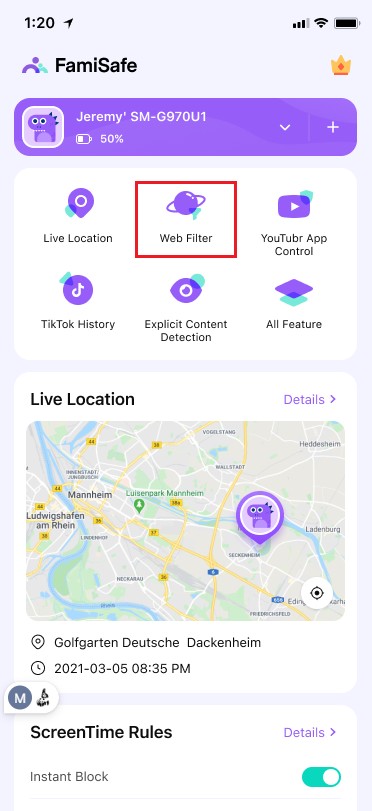
Step 1. Select Web Filter from the Parent's Device
After connecting both devices, choose the Web Filter feature from the main display.
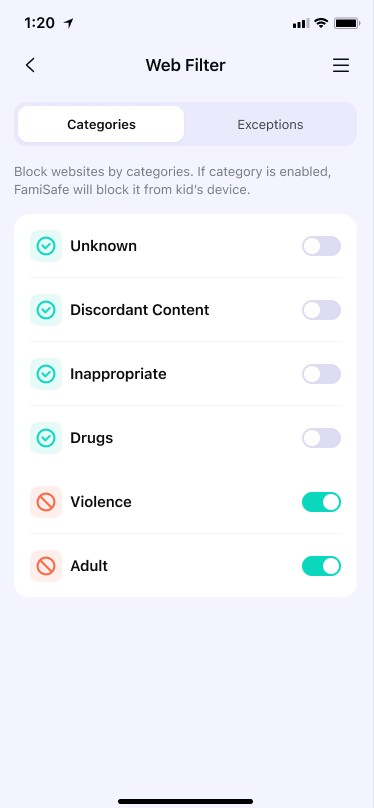
Step 2. Turn On Adult Toggle to Restrict Bad Content
Afterward, enable the Adult toggle under the Categories tab.
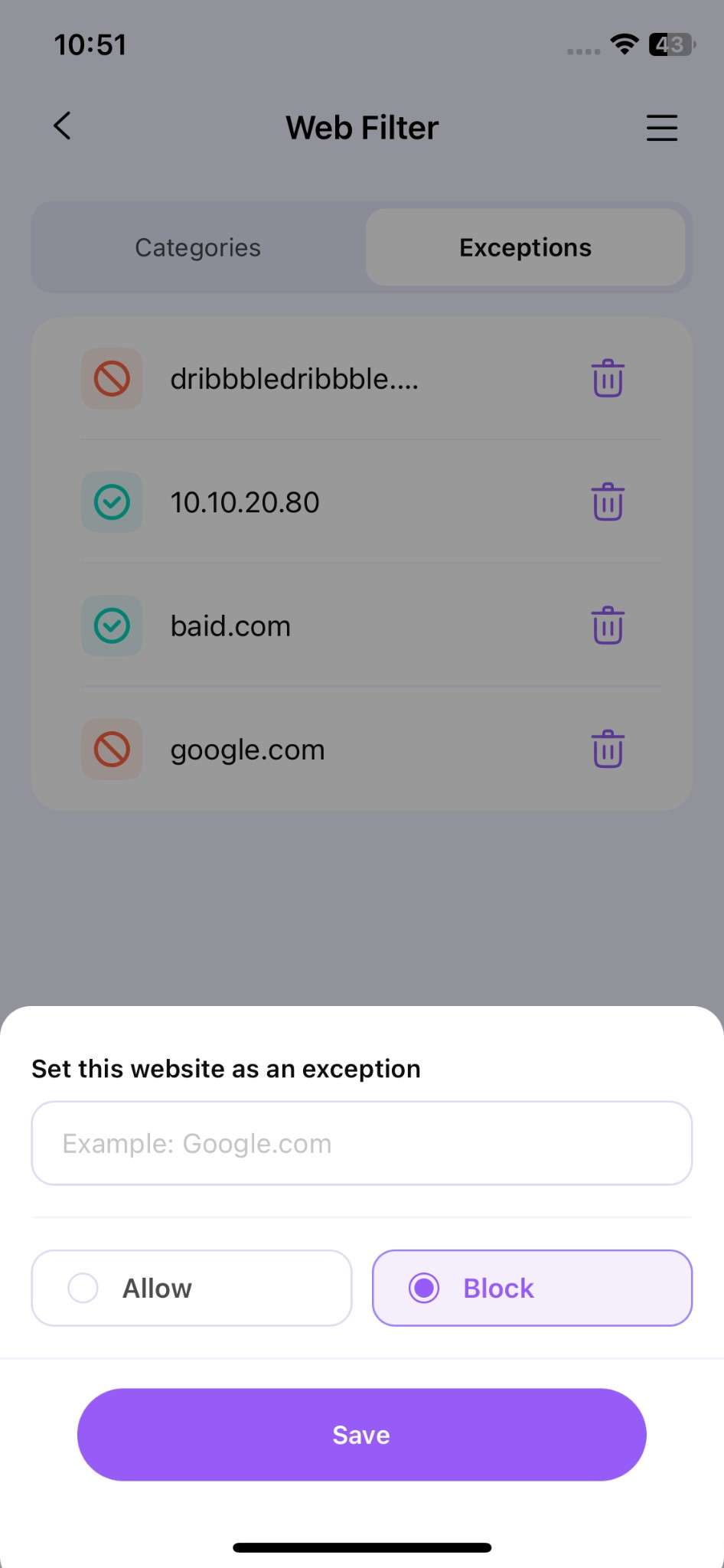
Step 3. Add XVideos to the FamiSafe and Block It
Later, tap Add Exception to add the XVideos site to select the Block option and hit the Save button.
Method 2. Use Built-in Parental Controls
Apart from the above advanced solution, parents can also block bad content with the help of iPhone and Android native settings. On iPhone, parents can use iPhone Screen Time to restrict harmful sites easily. Go to Settings, select Screen Time, enable Content & Privacy Restrictions, choose Web Content, and set it to Limit Adult Websites. This step is simple and effective for anyone learning how to block XVideos on a phone.
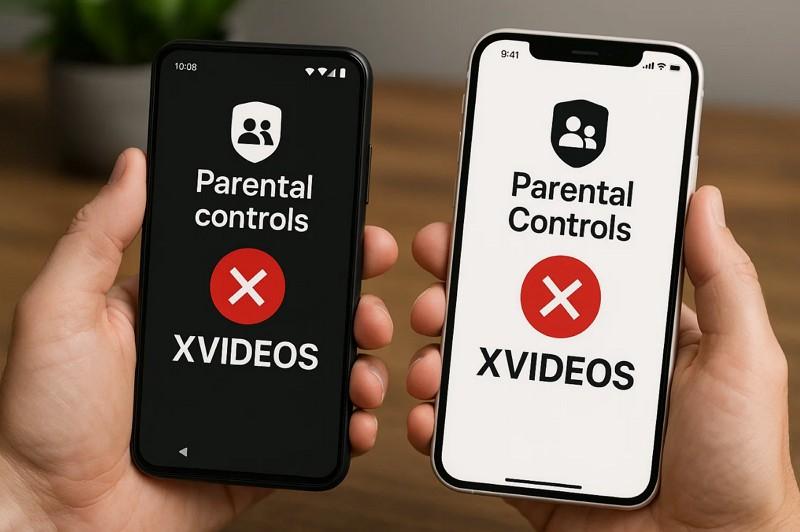
On Android, Google Family Link offers strong parental controls for blocking explicit content. Install the app, link your child’s device, and adjust Chrome and Google Search settings to block adult results. This prevents harmful material from appearing while your kid is browsing on their phone. Plus, it helps parents maintain a safe environment for children without interfering.
Method 3. Use Browser Extensions
For desktop users, browser extensions like BlockSite or Adult Blocker can block adult domains. Simply install from the Chrome Web Store and add XVideos to the blocklist.
| Method | Platforms | Strengths | Weaknesses |
| FamiSafe (Recommended) | iOS, Android, Windows, Mac, Chromebook | Cross-platform, remote control, detailed history | Paid (with free trial) |
| Built-in Controls | iPhone, Android | Free, easy setup | Limited, bypassable |
| Browser Extensions | Desktop browsers | Simple, lightweight | Easy to disable, browser-specific |
Conclusion
So, is XVideos safe? The answer is no. From malware and privacy tracking to legal concerns, the platform is unsafe for adults—and even more harmful for children, who may face emotional and developmental risks.
The best solution is prevention. With FamiSafe, parents can block XVideos, filter explicit content, and monitor browsing activity across devices. 👉 Start your free trial today and create a safer online world for your kids.