
pc-download-bottom
wondershare
  • Featured Products
    AIGC Digital Creativity
    Video Creativity Products
    • Filmora
      Complete Video Editing Tool.
    • ToMoviee AI
      All-in-One AI Creative Studio.
    • UniConverter
      AI Media Conversion and Enhancement.
    • Media.io
      AI Video, Image, Music Generator.
    • SelfyzAI
      Portrait AI Vdeo, Image, Music Generator.
    • < enk Al
      Enk A SelfyzAI
      Songs & Photos into Video Creativity Products
      < virbAl
      VirbA ToMoviee AI
      Marke Plat ri Video Creativity Products
      EdrawMax
      Simple Diagramming.
    • EdrawMind
      Collaborative Mind Mapping.
    • Edraw.AI
      Online Visual Collaboration Platform.
    PDF Solutions Products
    • PDFelement
      PDF Creation And Editing.
    • PDFelement Cloud
      Cloud-Based Document Management.
    • PDFelement Online
      Free PDF Tools Online.
    • HiPDF
      Free All-In-One Online PDF Tool.
    AI Solutions
    • AI Hub
    • Social Media
    • Marketing
    • Digital Creativity
    Utility
    Utility Products
    • Recoverit
      Lost File Recovery.
    • Repairit
      Repair Broken Videos, Photos, Etc.
    • Dr.Fone
      Mobile Device Management.
    • MobileTrans
      Phone To Phone Transfer.
    • Relumi
      AI Retake Photos.
    About Wondershare
    • Business
    • Affiliate
    • About us
    • Newsroom
    • Shop
    • Support
    View All Products
  • Business
    Overview
    Overview
    • Enterprise
    • Education
    • Partners
    • Affiliate
    • Resources
    Solutions
    PDF Solutions
    • PDFelement
    Diagram & Graphics
    • EdrawMind
    • EdrawMax
    Video Creativity
    • Filmora
    • UniConverter
    • DemoCreator
    Utility
    • Dr.Fone
    • Recoverit
    • MobileTrans
  • About Us
    About Us
    • About Us
    • Our Story
    • Careers
    • Contact Us
  • Newsroom
  • Shop
  • Support
wondershare
Explore Wondershare
famisafe logo FamiSafe
Try Now
  • Products
    school icon
    FamiSafe
    Safeguard Your Children's Digital Life
    Try It Free
    school icon
    FamiSafe for School
    Keep Schools & Parents Connected
    Try It Free
    geonection icon
    Geonection
    Bridge Distance Unite Psychologically
    Try It Free
    Try It Free Online
  • Features
    Device Activity
    • Calls & MessagesHOT
    • Screen TimeHOT
    • Screen ViewerHOT
    • App RulesHOT
    • One-way AudioHOT
    • Activity Report
    Content Safety
    • YouTube Parental Control
    • TikTok History
    • Inappropriate Pictures
    • Social App DetectionNEW
    • Web Filter
    • Browser History
    Location Service
    • Location TrackingHOT
    • Driving Report
    • SOS Alert
    Try It Free Online
  • Blog
    Location Tracker
    • Mobile Tracker
    • Location Sharing
    • Family Tracker
    • Teen Driving
    Screen Time
    • Screen Time Control
    • iOS Parental Control
    • Android Parental Control
    • Desktop Parental Control
    • Chromebook Control
    App Blocker
    • Block Games
    • Block YouTube
    • Block Apps
    • Block Porn
    Activity Monitor
    • Web Filtering
    • Phone Monitoring
    • Teen Sexting
    • Anti Bullying
    Parenting Knowledge
    • Parenting Tips
    • Teen Slang
    • Trending App Review
    • Parental App Review
    Read More>
    Try It Free Online
  • Resource
    Featured Topics
    • Digital Child Security
    • Balance Screen Time
    • AI Concerns Activity
    • Teen Sexing
    • Block Porns
    • Stop Sextortion
    • Stop Cyberbullying
      FamiSafe Guide
      • User Guide
      • User Guide for School
      • Video Guide
      • User FAQs
      Explore
      • What's New
      • Parents Review
      • Media Review
      • Family Stories
      • Brand Campaigns
      • Annual Report
      • Become Partner
      • Download App
      Try It Free Online
    • Pricing
    • Try It Free Download Pricing
      div> > Download App
      earcxpanded=g"> - earcxn-ti2 Try It Free
      src6 6 24.888im alt sav -2earch> 2
    ga360-dropdow66"> _2_FfamisLidt_154 pan c1.3562l" 8211820-n9445sc-M445a915n="r8235C445a915n=9 5Cn" 80 22.647 5.76 22.647 C9 4472 22.647 7n94446n=9 5Cn7n94446n="r8235C7n94446n=0.50eMnd 4472 7 5.76 7C" 80 n9445a915n=0.50eMn445a915n="r8235_.5 1.6Lder_154 <46ml" 8235C7n94446ml0.50hare 4472 7om5.76/ 7Cane0:// wonder915ml0.50 Review e.com/store/family.html">P -su > 2 li nej ">2earchghiv class="navbarDropdo stroke="black" stroke-width class= Start Free Trail
    modal element

    FamiSafe Parental Control

    Protect your kids online with smart parental controls and real-time monitoring.

    Got It
    Try It Now

    How to Block Porn Sites?

    Block Pornography

    ALL TOPICS

    YouTube Parental Control
    • How to see your YouTube history?
    • Put parental controls on YouTube
    • Delete TikTok Account without Phone Number
    • Ways to block YouTube channels
    • Ways to Get Somone's IP Address and Hide IP Address
    • A complete guide on YouTube parental control
    • Kids safe YouTube alternative
    • Top 5 TikTok Alternatives
    • Methods to restrict YouTube adult content
    Social Media App Parental Controls
    • Set parental control on Whatsapp
    • Is WhatsApp Safe?
    • The dangers of Snapchat sexting
    • Guide to Live Stream on Discord
    • Ways to blocking Facebook on iPhone and Chrome
    • Snapchat parental control for parents
    • 3 Ways to Get TikTok Account Unbanned
    • Watch TikTok on TV
    Parental Control Tips
    • How to set up Netflix parental controls?
    • Guide to Xbox Family Parental Control
    • The most dangerous apps for kids 2020
    • Inappropriate Roblox games
    • Best iPhone parental monitoring apps
    • Android remote control
    editor image
    Thomas Jones

    Dec 12, 2025 Filed to: Block Porn Proven solutions

    Thousands of children and adolescents are injured to varying degrees, and even lose their lives because of participating actively, voluntarily or involuntarily in a war. Some are recruited as soldiers, and many others are caught by crossfire, being them civilians neutral. Those wounds and deaths are most unfortunate.

    There is another crossfire that shoots against young people today, and that is capable of deteriorating and ending their lives: pornography and the addiction it generates. Unfortunately, we as parents cannot watch over them or protect them all the time, but we can help them recognize the dangers they are exposed to if they give in to those practices and, if they are already involved in those behaviors, we can block adult websites to help them restore their lives.

    Block Porn Sites

    At present, there are numerous web pages of access to pornographic material. Actually, pornography is reserved for adults. There are studies that reveal that 34 percent of young people between ten and seventeen say they are exposed to unwanted online sexual content, and 75 percent of Websites that contain pornographic material display visual advertisements on their access pages without first consulting the age of the visitor to the website.

    The effects of pornography have recently been studied in very serious ways by many specialized and interdisciplinary groups. All conclude that exposure to pornographic material generates a deterioration in personality, although this is very slight or is disguised by the effects of other moments or difficulties (exams, anguish, etc.). Without the presence of the following signs is exactly the reflection of an addiction to pornography, they should alert you to find out if there is a problem that your child can not solve alone.

    From the studies that show the high figures of use and abuse of pornography in adolescents and young people, it is clear that pornography is a great attraction in this age group that is so vulnerable due to their neuropsychological and social processes. Therefore, it is necessary to review the negative effects and block pornography.

    How Can FamiSafe Parental Control Help?

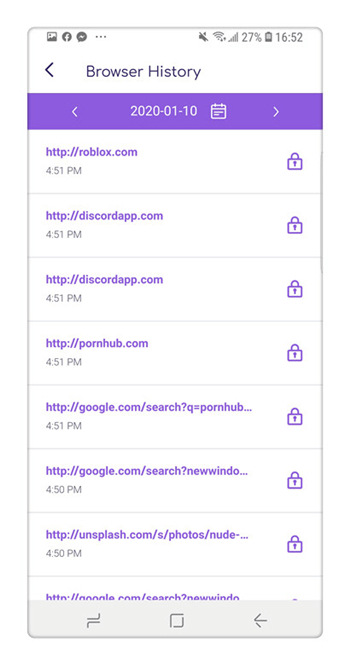
    Discovering your children’s browser history is a simple job, but in the same way, children are extremely intelligent individuals and end up breaking barriers. Using parental spy tool FamiSafe, you can access your children’s browser history and block adult websites very successfully.

    FamiSafe is an ideal tool that shows you how to block porn sites allows you to have a simple and while remaining invisible, a glance at the browsing history of your child periodically. FamiSafe should be considered as the best Parental Control and Monitoring software because of the following features:

    • See the websites that your child visited with their device
    • View and track each URL that was visited by your child
    • Have access to the number of times your child visited a website
    • Have access to date and time stamps: know when the site was visited, how long, what day, etc.

    Once the software has been downloaded, a private online account will be dedicated to you. It is from this dedicated account completely secure that you will not only control the online activities of your kids under your surveillance but also you can block adult websites from their device. You can access your FamiSafe account anywhere and anytime as long as you have an internet connection.
    block adult websites

    How to block porn sites on Windows PC?

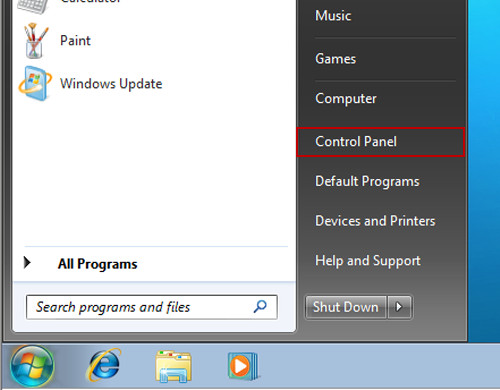
    The process of how to block porn sites on Windows PC, just follow these steps:

    Step 1: Go to the start menu >> Control Panel.
    how to block porn sites

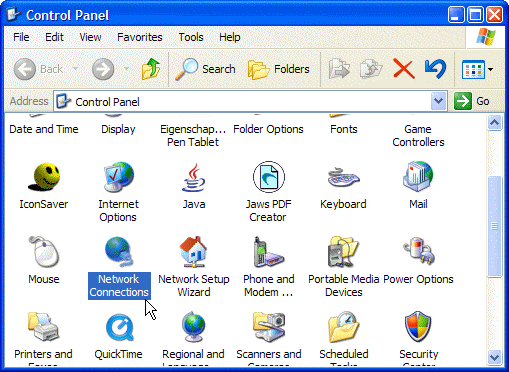
    Step 2: Please choose Network Connections.
    how to block adult websites

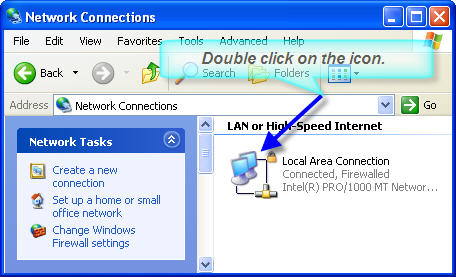
    Step 3: Choose the properties of the connection to the local network.
    block porn sites on Windows PC

    Step 4: Select the properties of Internet Protocol (TCP/IP) in the menu that appears.
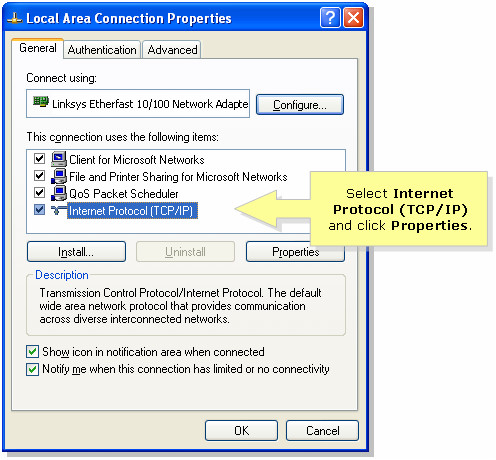
    block adult websites on Windows

    Step 5: And then select using the address of the next DNS.

    Step 6: Please enter only the IP address 180.131.144.144 in Preferred DNS Server and below 180.131.145.145 in Auxiliary DNS Server.
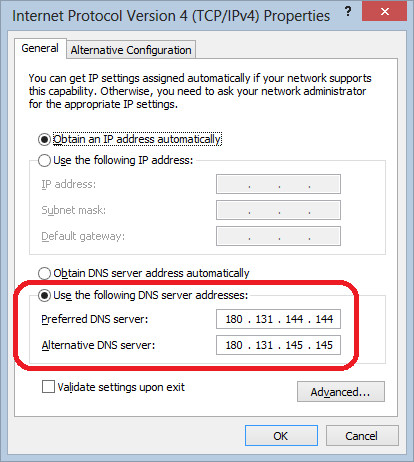
    block adult websites on pc

    How to block porn sites on Mac?

    There are many methods to block pornography sites on Mac. Here, we are going to discuss Enabling Parental Controls method, which is given below step by step with screenshots:

    Step 1: At the outset, you are going to click on the apple logo at the corner of the top left of the display. Then, select the system preferences.
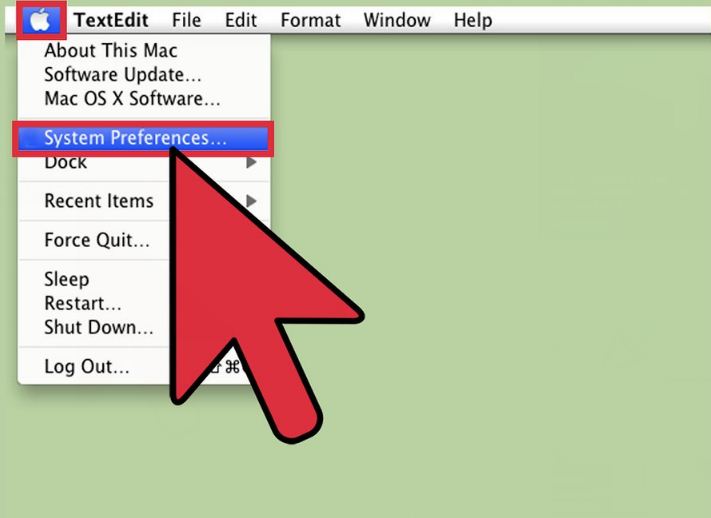
    block pornography

    Step 2: At this moment, the dialog box of system preferences will be exhibited. Now, tick on the yellow icon under the system category, which is recognized as “Parental controls”.
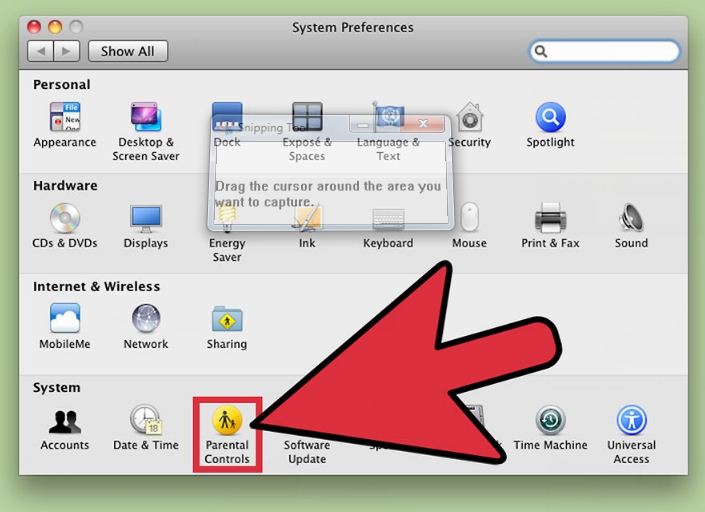
    how to block pornography

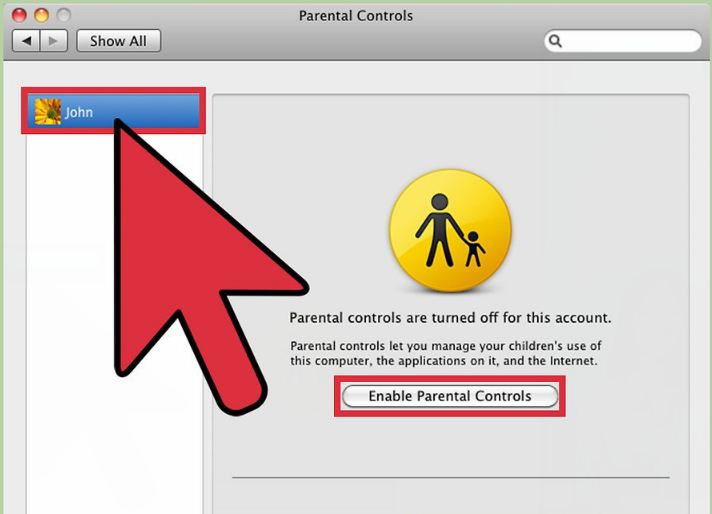
    Step 3: As soon as you clicked on parental control, then select the website user account that you want to block. Just then choose the option “Enable Parental Controls”. You are allowed to create a new account if your teen does not have an account.
    block adult websites

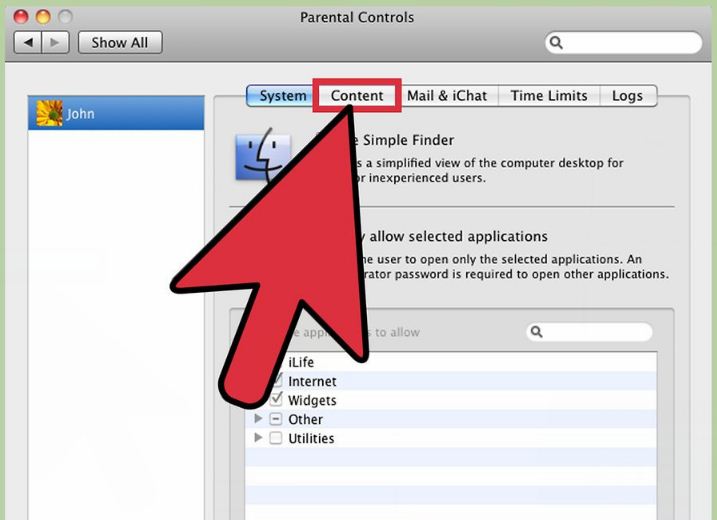
    Step 4: After completing the process that is discussed above, you are going to circumnavigate the “content” tab and make a tick on it.
    how to block adult websites

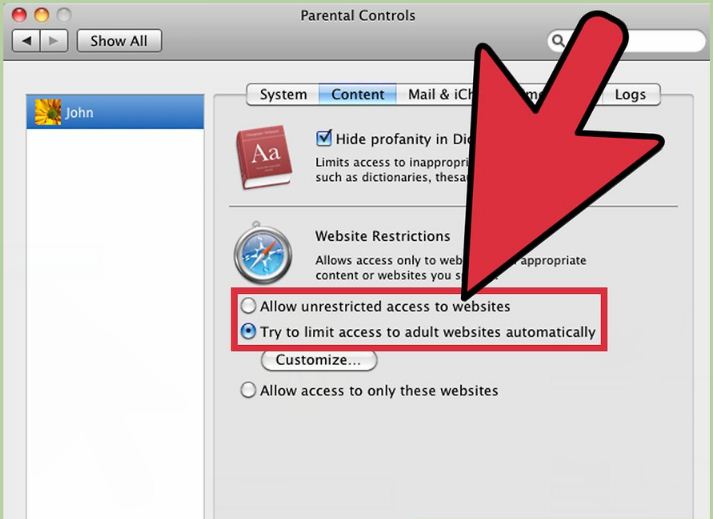
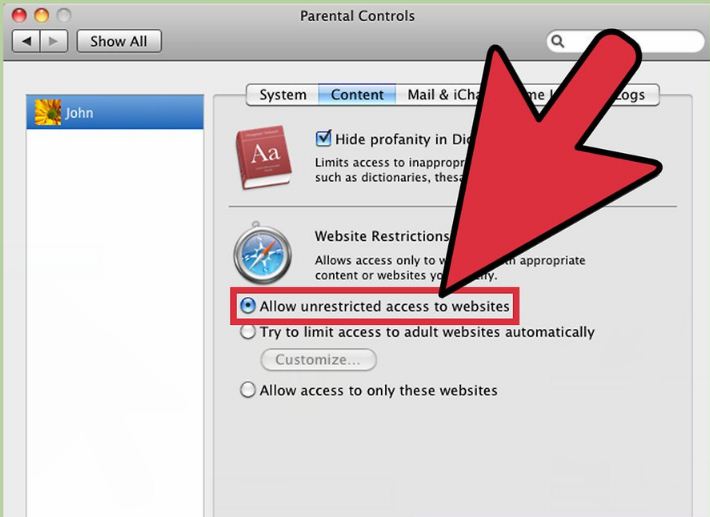
    Step 5: There are a few options to track online child activities below the content tab. At first, select the option “try to limit access to adult websites automatically” to block all pornography websites spontaneously. If not, then click on customize to remove or add the pornography website from the block list.
    block porn sites on Mac

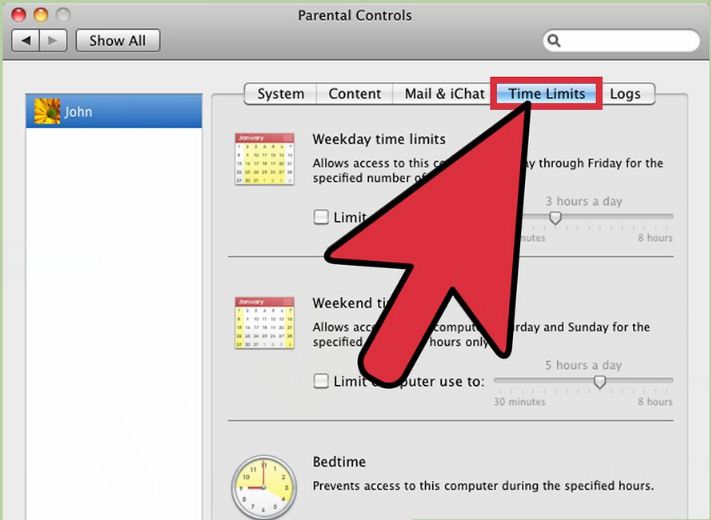
    Step 6: You are also to monitor time restrictions by selecting the option “Time Limits”. Now, you can adjust the time and settings to control access to unwanted websites.
    how to block porn sites on Mac

    Step 7: If it is necessary to unblock any website, just go back to the content tab and select the “Allow unrestricted access to websites” option.
    block adult sites

    In this current world, teens are spending lots of time on the internet. They are fully involved with the realm of online, which surely causes many negative side effects on them. So, it is necessary to defend teens from various activities on the internet. Because there is a huge possibility that they could be attracted and attached to deeds like watching pornography, cyber-bullying, predators, and many other threats, so, parents should take the step to protect their child from this kind of curse with the help of the best parental spy solution FamiSafe. Just create a FamiSafe account for free as soon as possible to block adult websites from their device.
    editor image

    Thomas Jones

    chief Editor

    famisafe aside banner

    Related Articles

    What Is &How to Block Spotify Porn Content

    NSFW Discord Servers: Lists & Safety Tips (Updated!)

    How to Block Adult Content on YouTube for Your Kids?

    Twitter Porn - Everything Parents Need to Know

    How to Block Porn on Android

    how to block porn on android

    How to Block Porn Apps and Websites on Your Kid's Phone

    block porn on android and iphone

    1. How-to
    2. Block Porn
    3. How to Block Porn Sites?
    wondershare creativity simplified
    Hero Products
    • Filmora
    • UniConverter
    • Recoverit
    • Dr.Fone
    • PDFelement
    • All Products
    Wondershare
    • About Us
    • Newsroom
    • Our Story
    • Careers
    • Education
    Explore AI 
    • AI Tools
    • Marketing
    • Social Media
    • Education
    • Business
    Help Center
    • Contact Us
    • Support Center
    • Account
    Terms and Conditions Privacy Terms of Use Do Not Sell or Share My Personal Information Cookie Preferences Refund Policy Uninstall

    Copyright © Wondershare. All rights reserved.

    English
    English Arabic - العربية Chinese - 简体中文 Chinese Traditional - 繁體中文 French - Français German - Deutsch Indonesian - Bahasa Indonesia Italian - Italiano Japanese - 日本語 Korean - 한국어 Portuguese - Português Spanish - Español Russian-Русский