5 Tipos de Juegos Inapropiados de Roblox: Guía para Padres
Top five inappropriate Roblox games You Should Block
ALL TOPICS
- YouTube Parental Control
-
- How to see your YouTube history?
- Put parental controls on YouTube
- Delete TikTok Account without Phone Number
- Ways to block YouTube channels
- Ways to Get Somone's IP Address and Hide IP Address
- A complete guide on YouTube parental control
- Kids safe YouTube alternative
- Top 5 TikTok Alternatives
- Methods to restrict YouTube adult content
- Social Media App Parental Controls
- Parental Control Tips

Sep 24, 2026 Filed to: Trending App Review Proven solutions
Los juegos inapropiados de Roblox pueden exponer a los niños a chats explícitos, juegos de rol sexualizados, violencia extrema, contenido de terror y conductas de grooming. A continuación encontrarás los 5 tipos de riesgo más comunes y una lista de comprobación de 10 minutos para que los padres mejoren la seguridad.

Tabla de Contenido
Parte 1. 5 tipos comunes de juegos inapropiados de Roblox
Cómo evaluamos una experiencia como “inapropiada”: riesgos derivados del chat y del contenido generado por usuarios, juegos de rol sexualizados, violencia o terror, señales de grooming y problemas recurrentes señalados por padres y medios. Los títulos concretos cambian con rapidez, pero los patrones de riesgo suelen repetirse.
En lugar de perseguir nombres de juegos concretos que pueden aparecer y desaparecer rápidamente, es más útil reconocer los tipos de experiencias inapropiadas y las señales de advertencia asociadas.
Utiliza la siguiente tabla para identificar lo que tu hijo podría encontrar y decidir cómo actuar.
| Tipo | Qué puedes encontrar | Nivel de riesgo | Edad de mayor preocupación |
|---|---|---|---|
| Juego de rol sexualizado / chat explícito | Coqueteo, conversaciones explícitas, peticiones de fotos o intentos de mover el chat fuera de Roblox | Alto | Menores de 13 años |
| Imágenes inapropiadas | Avatares o atuendos sugerentes, temas de “citas” y bromas para adultos | Alto | Todas las edades |
| Espacios de citas o “clubes” | Salas privadas, comportamientos románticos o sexualizados y presión para compartir datos personales | Medio | Menores de 13 años |
| Violencia extrema | Temas tipo gore, armas realistas o ciclos repetidos de persecución, muerte o escape | Alto | Menores de 13 años |
| Juegos de terror y sustos | Imágenes perturbadoras, persecuciones y sobresaltos intensos | Medio | Menores de 10 años |
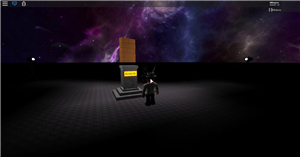
1) Juego de rol sexualizado / chat explícito
Estos juegos inapropiados de Roblox pueden parecer inofensivos al principio, pero el mayor riesgo suele estar en el chat: juegos de rol sexualizados, lenguaje explícito, solicitudes de fotos o intentos de continuar la conversación en otra aplicación.
2) Imágenes inapropiadas
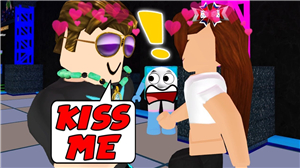
Algunas experiencias incluyen imágenes sugerentes, temas de “citas” o bromas para adultos. Aunque los gráficos sean caricaturescos, el contexto y las conversaciones pueden no ser adecuados para niños.

3) Espacios de citas o “clubes”
Los espacios de reunión pueden volverse problemáticos cuando incluyen habitaciones privadas, juegos de rol de citas o presión para compartir información personal. Este tipo de interacción también puede facilitar conductas de grooming.
4) Violencia extrema
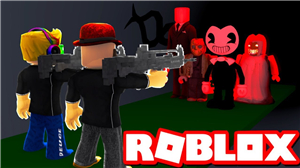
Algunas experiencias de Roblox se centran en asesinatos repetidos, armas realistas o escenarios de amenaza intensa. Si después de jugar tu hijo muestra miedo, ansiedad o problemas de sueño, conviene revisar qué experiencias está utilizando.
5) Juegos de terror y sustos
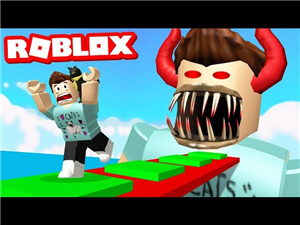
Los juegos de terror, persecución u “obby” pueden resultar demasiado intensos para los niños más pequeños. Incluso sin violencia gráfica, los sobresaltos, sonidos fuertes e imágenes oscuras pueden asustarlos.
Consejo: ¿Para qué edad es adecuado Roblox?
Las cuentas de menores pueden disponer de protecciones y restricciones adicionales, por lo que es importante configurar correctamente la edad de la cuenta y revisar las opciones de privacidad y contacto.
¿Está bien Roblox para un niño de siete años?
No depende únicamente de la edad. Los padres deben revisar el tipo de experiencias, los ajustes de privacidad y chat, y acompañar el uso. Una edad incorrecta en la cuenta puede hacer que algunas protecciones no se apliquen como esperas.
Parte 2. ¿Por qué los juegos inapropiados de Roblox pueden ser riesgosos para los niños?

Los padres pueden proteger mejor a sus hijos cuando entienden qué riesgos pueden esconderse detrás de experiencias aparentemente inofensivas. Conviene revisar con frecuencia los juegos que usan, con quién interactúan y si aparecen conversaciones o enlaces que intentan sacar al menor fuera de Roblox.
Roblox también se utiliza en distintos dispositivos. Puedes consultar: cómo jugar a Roblox en RV • cómo jugar a Roblox en Chromebook
La función de chat y el contenido generado por usuarios hacen que la supervisión sea especialmente importante. Los padres deben enseñar a sus hijos a no compartir datos personales, bloquear conversaciones incómodas y denunciar cualquier interacción sospechosa.
1) Estadísticas del informe Nielsen 360
- El informe citado en la versión inglesa señala un uso elevado de videojuegos entre menores de 12 a 15 años y un tiempo de juego semanal considerable.
- También recoge que los niños más pequeños utilizan dispositivos para jugar desde edades tempranas.
2) Roblox: recursos de seguridad y denuncias
Las políticas y herramientas de seguridad de Roblox cambian con frecuencia. Para revisar las opciones más actuales, conviene consultar los recursos oficiales de seguridad, privacidad, moderación y denuncia de la plataforma.
¿Por qué los juegos inapropiados de Roblox pueden ser malos para los niños?
1) Rendimiento académico
Cuando el tiempo de juego desplaza de forma constante el estudio, las tareas o las actividades familiares, puede afectar a la rutina académica del menor. Establecer límites ayuda a mantener un equilibrio.
2) Privación del sueño
Jugar durante largos periodos, especialmente por la noche, puede retrasar la hora de dormir. Los padres deberían establecer horarios claros y evitar sesiones prolongadas antes de acostarse.
3) Comportamiento y bienestar
El contenido intenso, violento o aterrador puede afectar de forma distinta a cada niño. Si aparecen miedo, irritabilidad o cambios de comportamiento después de jugar, es una señal para revisar los juegos y reducir la exposición.
¿Cómo encuentran los niños juegos inapropiados en Roblox?
Los niños pueden llegar a experiencias inapropiadas mediante sugerencias de búsqueda, recomendaciones, enlaces externos o copiando términos que ven en chats y videos. Con el tiempo, algunos aprenden palabras vagas o códigos para encontrar contenido arriesgado.
Consejo práctico: trata la búsqueda como una superficie que también debe supervisarse. Revisa los ajustes de privacidad y contacto, la lista de amigos y el historial de juegos con regularidad.
Parte 3. Reseñas reales de Common Sense Media
1. Lenguaje inapropiado, moderación insuficiente y violencia.
Algunos padres describen experiencias en las que sus hijos se encontraron con insultos, conversaciones de citas y juegos violentos. Estas reseñas reflejan experiencias individuales y no representan necesariamente a toda la plataforma, pero muestran por qué la supervisión sigue siendo importante.
2. Uso excesivo y caída del rendimiento escolar.
Otras reseñas de padres señalan que el uso excesivo de Roblox llegó a interferir con las tareas y el rendimiento escolar de sus hijos. Esto refuerza la importancia de establecer límites de tiempo y revisar la rutina de juego.
3. Conviene supervisar de cerca las conversaciones.
También hay padres que describen conversaciones inapropiadas dentro de determinadas experiencias y expresan preocupación por no saber si los otros jugadores son realmente niños. Supervisar el chat y hablar con los menores sobre contactos desconocidos puede reducir este riesgo.
Parte 4. ¿Cómo pueden los padres proteger a sus hijos de los juegos inapropiados de Roblox?
Estas son cuatro formas prácticas de reducir la exposición de los niños a experiencias inapropiadas en Roblox:
Lista rápida de seguridad: 10 minutos
- Revisa la edad configurada en la cuenta y las restricciones disponibles.
- Limita quién puede contactar, enviar mensajes o chatear con tu hijo.
- Revisa semanalmente la lista de amigos y el historial reciente de juegos.
- Enséñale a no abrir enlaces externos, no compartir información personal y bloquear o denunciar inmediatamente situaciones sospechosas.
Relacionado: Cómo configurar el control parental en Roblox
1) Juega con tu hijo o permanece cerca
Estar cerca mientras tu hijo juega te permite observar qué experiencias elige, con quién interactúa y qué funciones utiliza. Pregúntale con naturalidad qué le gusta del juego, quiénes son sus amigos y cómo decide a qué experiencia entrar.
También puedes crear tu propia cuenta y explorar Roblox junto a él. Jugar juntos facilita entender la plataforma y detectar antes los posibles riesgos.
Después, habla con tu hijo con calma sobre lo que habéis visto. La conversación abierta suele ser más útil que reaccionar únicamente cuando aparece un problema.
2) Configuración de privacidad y denuncia
Revisa los ajustes de privacidad, contacto y chat de Roblox y limita las interacciones cuando sea necesario. Las opciones disponibles pueden cambiar con el tiempo, por lo que conviene revisarlas periódicamente.
Enseña también a tu hijo a utilizar las opciones de bloqueo y denuncia cuando encuentre mensajes, imágenes o comportamientos sospechosos. Debe saber que puede pedir ayuda sin miedo a ser castigado.
3) Bloquear o restringir Roblox con FamiSafe
FamiSafe puede añadir una capa adicional de control parental para gestionar el uso de aplicaciones y el tiempo de pantalla. Sus funciones disponibles dependen del dispositivo y del sistema operativo.
- Filtro Web y SafeSearch
- Límite de Tiempo de Pantalla y Horario
- Seguimiento de Ubicación y Reporte de Manejo
- Bloqueo de Aplicaciones y Seguimiento de Actividad de Aplicaciones
- Monitor del Historial de YouTube y Bloqueador de Video
- Alertas de Textos e Imágenes Inapropiadas en Redes Sociales
- Compatible con varios dispositivos y sistemas operativos
En FamiSafe puedes utilizar funciones como reglas de aplicaciones e informes de actividad para gestionar el acceso de los niños a Roblox y revisar cuánto tiempo pasan en la aplicación.
El informe de actividad permite revisar el uso diario de Roblox y, cuando la función sea compatible con el dispositivo, aplicar límites o bloqueos.
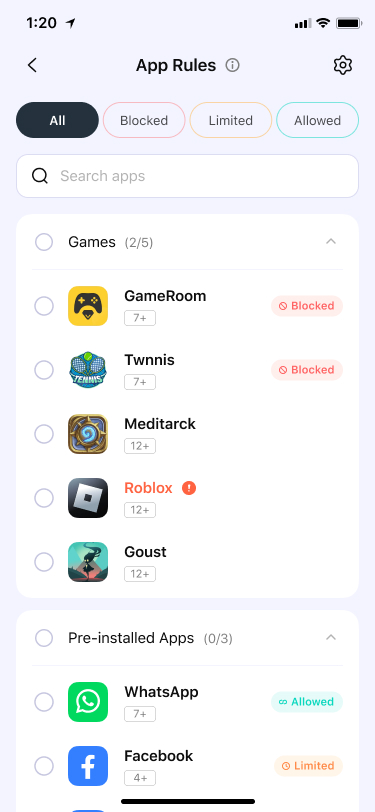
También puedes revisar el tiempo de uso de aplicaciones para decidir si es necesario ajustar los límites de pantalla.

Roblox incluye una gran variedad de experiencias creadas por usuarios. La mejor protección combina buenos ajustes de privacidad, supervisión activa y conversaciones frecuentes con los niños. Si necesitas una capa adicional de control, las herramientas de control parental pueden ayudarte a mantener reglas de uso más consistentes.
Preguntas frecuentes
¿Roblox es seguro para niños menores de 13 años?
Puede ser más seguro cuando se configuran correctamente la privacidad, los contactos y las restricciones disponibles, pero siguen existiendo riesgos relacionados con el contenido generado por usuarios y las interacciones con otras personas.
¿Cuáles son los principales riesgos que deben vigilar los padres?
Los riesgos más comunes incluyen juegos de rol sexualizados, contenido violento o aterrador, conductas de grooming y exposición a conversaciones o enlaces externos inapropiados.
¿Cuál es la forma más rápida de reducir la exposición?
Revisa la privacidad de la cuenta, limita quién puede contactar con tu hijo, restringe el chat cuando sea posible y comprueba con regularidad el historial de juegos y la lista de amigos.
Conclusión
Proteger a los niños de los juegos inapropiados de Roblox requiere supervisión, comunicación abierta y una configuración adecuada. Roblox ofrece muchas experiencias creativas, pero su naturaleza abierta y el contenido generado por usuarios también pueden exponer a los menores a conversaciones, imágenes o comportamientos que no son apropiados para su edad.
Mantenerte informado, revisar la actividad de juego y utilizar controles parentales cuando sea necesario puede ayudar a crear un entorno más seguro. Ninguna medida funciona por sí sola: combinar ajustes de privacidad, límites de tiempo, supervisión y conversaciones frecuentes suele ser la estrategia más práctica.
Thomas Jones
chief Editor