
Boo App Review: Is It Really Safe For Kids?
Boo App Review
ALL TOPICS
- Blocker App
-
- Best free call blocker app for Android
- Block Discord on Phone, Computer and Chromebook
- Best call blocker apps
- Website blocker apps and chrome extension
- Website blocker apps for studying
- Message blocker apps
- A Complete Guide to Block TikTok for Your Kids
- Steps to Block and Unblock TikTok from Network Router
- Game Blocker
- Social Media Blocker
- Lock

Apr 30, 2026 Filed to: Trending App Review Proven solutions
Social media is all the craze these days, especially with the younger generations. It’s quite possible that you may not even be aware of the popular social media apps that your kids are obsessing over.
One popular app amongst teens and kids nowadays is the Boo chat app. And why shouldn’t it be? It looks fun, it’s very visually pleasing, and you get to share cool content with your people.
What Is the Boo Chat App?

Boo is basically a video chat app that allows users to create custom 3D avatars. It’s fairly easily to use; choose a gender, race, features, style, and outfits. You can even do home decor, invite your friends to visit your place in the game, collaborate on-camera, and make fun videos.
The camera works in two ways. You can use the Selfie Camera to take your picture and turn it into an avatar. With the AR Camera, you can make your avatar do things like dancing, playing with friends and more. In this Boo app review, we will explain the impact of the app on children and teens.
Why Boo App Is So Popular?
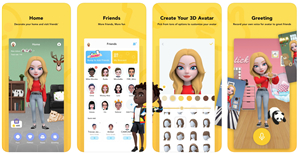
Boo app has all the makings of a viral sensation amongst kids and teens. The app is colorful, fun, full of features, and your kids get to interact with their friends in a whole new way. This app has been made to get the millennials and generation-z hooked to it with a combination of messaging, video chat, games and more.
The app also has a paid version that is priced at $9.99/month. This includes additional features such as no ads, more items for customizing the avatar, personalized photos, and making emojis using the Selfie Camera.
Why Boo App Is Not Safe for Kids
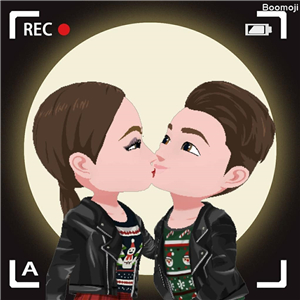
Boo has now developed a reputation for being a sex chat app. As a parent, you should watch out for the following things:
- Sexual Content: An app that allows your kids to record themselves doing just about anything can be dangerous. You may not know this but adults use Boo as well. Your child’s avatar might be making out with an avatar of a sexual predator. Many kids and teens may solely use Boo for the purpose of making out or performing sexual acts with each others’ avatars.
- Cyberbullying: As Boo is also a texting app, kids may be at risk of getting bullied online. Other kids or teens may make fun of your kid’s avatar, their activities on the app, or may send them hateful messages. This may have a carryover effect where your kid is bullied online as well as in real life, whether in school or outside when they’re playing.
- Violence: As the app allows members to record themselves performing various activities, some kids may engage in violence like beating other kids up, breaking stuff at their home, or more, just to get the views. This could have a very negative impact on your child because, at that age, they are very impressionable.
- Addiction: Parents today should be more concerned about how much time their son or daughter spends on their mobile devices. Apps like Boo are designed to make sure kids and teens spend all their time on them. This could also have a carryover effect where getting addicted to the app lead them to suffer in real life.
Other than the reasons stated, there have been multiple reports about the dangers of the app. Here are a few:
If you are not down with your kids talking to strangers on the internet (yes, I know it’s 2019 – doesn’t mean we don’t have to stay woke to internet weirdos!) – know that a big component of the Boo app is social. You create an avatar that uses characteristics of yourself.
Don’t help your children build a positive digital footprint and when tweens and teens have anonymous avatars to hide behind, they tend to misbehave more than if they’re actions are tied to their real name.
What Age is the App Hooked for?
The Boo app has a rating of 9 years and above. In our opinion, this rating is completely wrong and we will explain why in this Boo app review.
Given the fact that kids can engage in virtual sex, avatar violence, and foul language, the app should at least have a rating of 15 years or above. A kid who is 9 years old is mostly oblivious to sex, but more importantly, is impressionable.
Such a kid, when exposed to sexual content, profanity, and cyberbullying, may get psychologically impacted that can affect their proper growth and development. In addition, they may start to associate their life with the app more and start to disassociate themselves from real life, their families, and society in general.
What Can Parents Do to Protect Kids from Boo?
Not all hope is lost. Here are a few things you can do to prevent your child from getting addicted to Boo:
1) Encourage Them to Meet Their Friends
In most cases, kids use apps like Boo to keep in touch with their friends and do cool things while they’re at home. What you can do in this scenario is that you can encourage your child to actually go and meet their friends. Invite their friends over to your place, or push them to organize hangouts and meetups outside where they can interact in real life.
2) Stage an Intervention
If your kid is getting addicted to Boo, NOW is the time to sit them down and start talking. Make them understand that you love them and you don’t want them to destroy their life over an app that has no real-life value. If you don’t want to completely ban them from using the app, you should educate them about the dangers of apps like Boo and what they can do to avoid the negative aspects of them.
3) Install Parental Control Apps On Their Phones
A parental control app can truly be a game-changer. Apps like FamiSafe offer excellent parental control features on both Android and iOS platforms. With FamiSafe, you can always monitor the mobile activities of your kids. It has an app block feature that lets you block your child from downloading and using apps like Boo.

- Web Filtering
- Location Tracking & Geo-fencing
- App Blocker & App Activity Report
- Screen Time Limit & Schedule
- Explicit Content & Suspicious Photos Detection
If you don’t want to block Boo, you can always keep tabs on them using the Screen Time feature. It basically lets you monitor how much time they spent on the app and how many hours a day they use the app. This can allow you to schedule usage through the Smart Schedule feature so that your kids are not getting addicted to the app or their mobile phones.
Activity Report is perhaps the best feature of the app. It gives you daily updates on mobile activity of your kids and you can monitor their browsing activity as well. You can also block them from accessing websites, images, content or apps that you find inappropriate. All you have to do is add the keywords into the app and that will do the job!
Keep Your Children Safe
So far, what we’ve learned in this Boo app review is that apps that may look cartoonish may not always be safe for your kids. Taking the safety of your children in your own hands should be a priority in an age where they have access to inappropriate content at their fingertips. Apps like FamiSafe can help you ensure that your kids are safe from the dangers of mobile and the internet.
Moly Swift
staff Editor